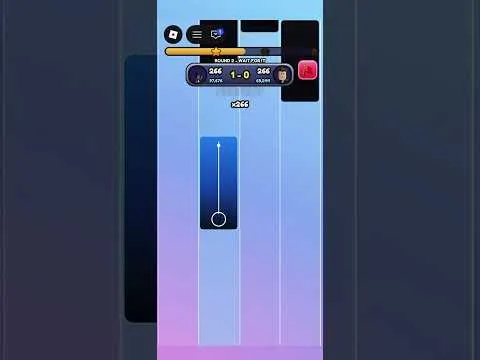
Competition

Play a 1v1 Match

1v1 is the official head-to-head mode. Queue after you can clear a song, and do not expect a skin to change the result.

Play a 1v1 Match

1v1 is the official head-to-head mode. Queue after you can clear a song, and do not expect a skin to change the result.

What 1v1 is confirmed to be

The official line is short: challenge another player in 1v1. A public server can hold 25 players, but the description does not say you must fill the server, how you queue, how a winner is chosen, or whether both players hear the same song.

Community guides describe both players facing the same rhythm challenge, with timing deciding the round, and they describe tile skins as cosmetic. Those details are not in the official description. Use them as a briefing, then confirm the match screen in game.

Before you queue

  1. Clear at least one song at a speed you control. A 1v1 is a poor place to learn the client.
  2. Stay on the control method from Set Up Touch, Keyboard, or Controller.
  3. Do not equip a skin in order to score more. Nothing official assigns a scoring bonus to a skin or a background. See Read Stars, Bests, and Cosmetics.
  4. Start the 1v1 from the mode the client labels as 1v1. This page cannot name the button, because the public description does not.

During the match

Play the chart you are given. If the client shows the other player's progress, use it as a reference, not as a reason to rush notes you cannot see yet. If it does not show the other player, the official description still only promises a challenge against another player.

One community claim is that a missed tile can swing the match. That is not the same as a published rule that one miss ends your side. Watch the result the client prints.

After the match

Compare the result with your own previous best, not with a rank table. No rank tiers, rating points, or season resets are published. Stars and leaderboards exist for the game as a whole. The description does not say a 1v1 pays a different star amount than a song.

A community video title mentions a 1v1 alongside a piece called Your Reality. That title is not a song catalog. The clip is on Video Guides.

Mode comparison: Choose a Mode. Entity page: 1v1.

FAQ

Frequently Asked Questions

What is Piano Rhythm Tiles?

Piano Rhythm Tiles is a free Roblox rhythm game by the Music Tiles group. You play songs, choose a speed, and follow tiles. The public description also lists Endless mode, 1v1, a Daily Song, Fade mode, tile skins, backgrounds, stars, personal bests, and leaderboards.

Who makes Piano Rhythm Tiles?

The Roblox games record credits the group Music Tiles. The public group page is the creator community linked from the experience. This wiki is not run by Music Tiles or Roblox.

Is Piano Rhythm Tiles free?

Yes. The public games record shows no Robux price. Optional unlocks such as tile skins and backgrounds are mentioned, but no price list was published with that record.

What modes does Piano Rhythm Tiles have?

The official description names five activities: play songs at a speed you choose, Endless mode that builds up speed, a 1v1 challenge against another player, a new Daily Song, and Fade mode where tiles disappear.

Which controls work?

The official description says you can play with touch, keyboard, or controller. It does not publish the key or button names. Use the mapping shown inside the game.

Are there Piano Rhythm Tiles codes?

No code string was found in the official description or in collected code records. The redeem button location is also unpublished, so this site does not list a working code or a confirmed menu path.

Is there a published song list?

No. The official description says you can play songs and pick a speed, and that there is a Daily Song. It does not name the tracks, note counts, or difficulty numbers. Use the list shown in the client.

Do tile skins change my score?

The official description lists tile skins and backgrounds as unlocks, separate from stars and leaderboards. It does not give skins a score, speed, or match bonus. Community guides describe them as cosmetic. Check the customization screen in game before assuming a cost or an effect.